Training models in PyTorch often feels slower than it should be. You press run, sip your coffee, and hope it finishes before your system heats up like a toaster. Many times, the problem isn’t your code or the model itself—it’s how you’re handling the small things that quietly steal your time. What’s encouraging is that fixing these doesn’t require anything fancy or technical. You need to be aware of where those slowdowns are happening.
By paying attention to data loading, hardware setup, and a few smart training habits, you can shrink your training time without rewriting everything from scratch. It’s like tuning an engine. You’re not changing the car, just making sure it runs smoother and doesn’t waste fuel. The tips below follow this idea—small, real changes that help you get to the result faster and with less frustration.
Start With Your Data Pipeline
A surprising amount of training time gets wasted just waiting for the next batch of data. If your model is fast but your data loader is slow, you’re not going to see the results you expect. PyTorch’s DataLoader gives you a way to load multiple batches in parallel by increasing the number of workers. This lets you use your CPU more effectively and avoid idle time between batches.
It’s also worth checking how much preprocessing you’re doing during training. If your data is being resized, normalized, or transformed while the model waits, you're losing valuable seconds every step. You can fix this by caching those processed results ahead of time. Once the data is clean and ready, load it directly instead of repeating the same operations during every run.
Adjust Batch Sizes Carefully
Batch size affects more than memory usage. It controls how fast your model trains and how many updates it makes during each epoch. Small batch sizes often result in slower training because your model has to make more updates to complete one pass through the data. But if your batch is too large, your system could crash or slow down due to memory overload.
The best way to handle this is through testing. Start with a moderate batch size and increase it until your GPU or CPU gets close to its limit. Keep an eye on training speed and accuracy to find the right balance. Sometimes, just a small bump in batch size can save minutes without hurting model performance.
Keep Model and Data on the Same Device
It’s a common mistake—your model sits on the GPU, but the data is still on the CPU. When this happens, PyTorch has to transfer data every time a batch is loaded. This back-and-forth takes time and interrupts the flow. Always move your input data to the same device where your model lives to keep things running smoothly.
This check takes just a moment and prevents hours of slow training later on. If you’re not sure, print out the device of both your model and a sample input tensor before training. Matching them avoids unnecessary copying and helps your training loop move faster without confusion.
Use Mixed Precision Training If Possible
Mixed precision uses 16-bit floats instead of 32-bit where possible. This cuts memory use and speeds up training, especially on newer GPUs. PyTorch has a tool called torch.cuda.amp that lets you do this easily. You don’t need to rewrite your code. Just wrap your training steps, and PyTorch handles the rest.
Not all models react the same way to mixed precision, so test it with your project. You might find training is not only faster but also smoother, especially when memory is tight. And since it’s supported directly in PyTorch, it feels less like a shortcut and more like a built-in upgrade.
Don’t Overcomplicate Your Model
When training slows down, some people keep adding layers, thinking it will help. But more complexity often leads to longer training times without any real gains in accuracy. Simpler models are easier to manage and usually train faster. If you’re not working on a highly specialized task, start with fewer layers and only add more if results demand it.
Track changes closely when you adjust your model. Each new layer might bring a cost in time that isn’t worth the slight improvement. A clean, well-structured model can often perform just as well while cutting down the number of hours needed to reach good performance.
Use Transfer Learning When It Fits
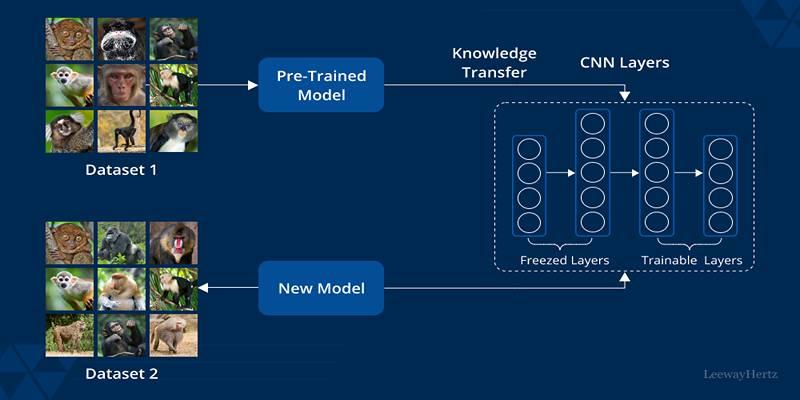
Transfer learning lets you borrow knowledge from pre-trained models. Instead of building from scratch, you take a model trained on a similar task and fine-tune it for your own. This saves time and often leads to better results, especially on tasks like image classification or language modeling.
In PyTorch, using pre-trained models is simple. Load one from torchvision.models, freeze some of the early layers, and adjust the last ones for your dataset. This cuts training time because your model doesn’t have to relearn the basics—it just adapts them to your specific needs.
Try Gradient Accumulation On Smaller Machines
If your device can’t handle large batches, gradient accumulation gives you a workaround. Instead of updating the model after every batch, you collect the gradients over a few small batches and then update once. This simulates training with a larger batch size without using more memory.
You’ll need to adjust the learning rate slightly to match the new update behavior. But once you’ve got it set, training becomes more efficient, especially when running on limited hardware like a laptop or small server. It helps you keep pace without burning through resources.
Conclusion
Speeding up PyTorch training is less about tricks and more about smart habits. Use your hardware wisely, streamline your pipeline, and simplify wherever you can. Whether it's mixed precision, transfer learning, or just cutting back on logs, every improvement helps.
You don’t need to be a deep learning expert or rewrite everything—make consistent choices that keep training smooth and efficient. With fewer slowdowns, your model gets more chances to improve, and you get more time to focus on what really matters.